Customer insights
Understand who your customers are, how often they visit, how much they spend, and where your biggest retention opportunities are.
Overview
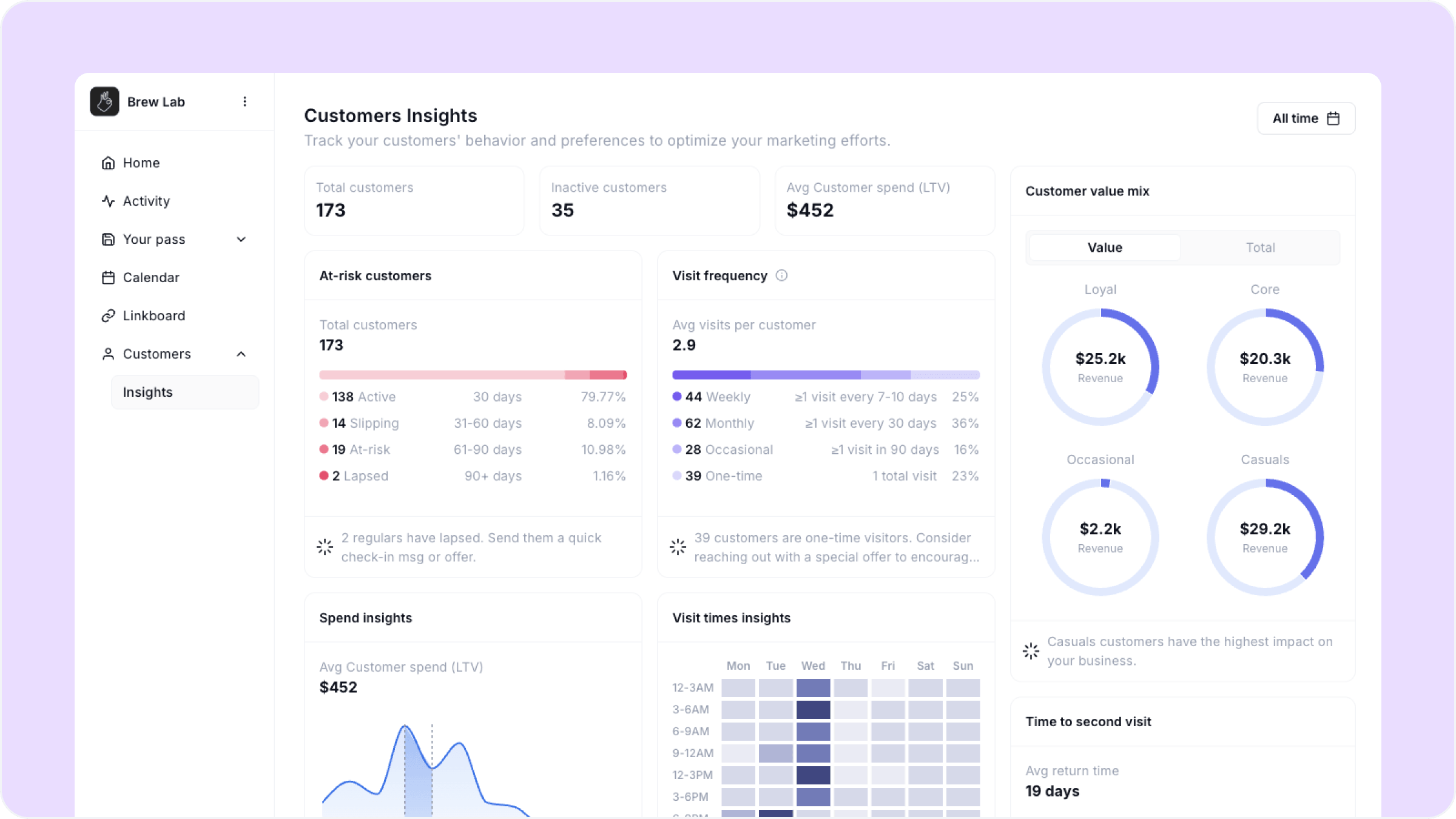
Customer insights gives you a detailed breakdown of your customer base — not just how many customers you have, but who they are, how they behave, and what they are worth to your business over time. Use it to make smarter decisions about your rewards, your Moments, and where to focus your energy.
To get here, go to Customers, then Insights in your dashboard.
Customer insights is available on the Loyalty and Growth plans. If you are on Starter you will need to upgrade to access this section.
Top level metrics
At the top of the page you will see three numbers:
Total customers The total number of customers who have saved your pass.
Inactive customers Customers who have not made a transaction in the selected period.
Avg customer spend (LTV) The average lifetime value of a customer — how much the average customer has spent across all their visits since joining your program.
At-risk customers
This section breaks your full customer base into four segments based on how recently they have visited:
Active — visited within the last 30 days
Slipping — last visit was 31 to 60 days ago
At-risk — last visit was 61 to 90 days ago
Lapsed — last visit was more than 90 days ago
Each segment shows the number of customers in it, the days since their last visit, and what percentage of your total base they represent.
Below the segment breakdown Worthify surfaces a contextual insight — for example if you have customers moving into lapsed it will suggest sending a re-engagement message or offer.
Visit frequency
Shows how often your customers are visiting, broken into four groups:
Weekly — at least one visit every 7 to 10 days
Monthly — at least one visit every 30 days
Occasional — at least one visit in the last 90 days
One-time — customers who have only ever visited once
The average visits per customer is shown at the top of this section. The contextual insight below flags opportunities — for example a high one-time visitor count is a signal to strengthen your welcome experience and first reward threshold.
Customer value mix
Shows how your customer base breaks down across four value tiers — Loyal, Core, Occasional, and Casuals — by both customer count and total revenue generated. Toggle between Value and Total at the top to switch views.
This section tells you which segment is driving the most revenue for your business. A large Casuals segment generating significant revenue, for example, signals a strong opportunity to convert them into more frequent visitors.
Spend insights
Shows the distribution of customer lifetime spend across your base, plotted as a chart by spend range. The average customer LTV is shown at the top.
The contextual insight below benchmarks your average spend against typical ranges and flags whether you are above or below average — useful for understanding whether your rewards are attracting high-value customers.
Visit times insights
A heatmap showing when your customers are visiting by day of the week and time of day. Darker cells indicate higher visit volume.
Use this to understand your busiest periods, plan staffing, and time your Announcements and promotions for when customers are most likely to be thinking about you.
Time to second visit
Shows the average number of days it takes a customer to return after their first visit, and how that changes between the first, second, and third visit.
This is one of the most actionable metrics in Worthify. If your average return time is long, consider tightening your Bring customers back Moment trigger or making your first reward easier to reach.
Age demographics
Shows the age breakdown of your customer base across three views:
By count — which age groups make up the largest share of your customers
By spend — which age groups spend the most on average
By visits — which age groups visit most frequently
Each view includes a contextual insight surfacing the most relevant finding — for example which age group contributes the most total revenue or returns most frequently.
The combination of visit frequency, time to second visit, and at-risk segments tells you almost everything you need to know about your retention health. Check these three together at least once a week and you will always know where to focus.
FAQs
How is LTV calculated? Lifetime value is the total amount a customer has spent across all their recorded transactions since joining your program.
What is the difference between inactive and lapsed? Inactive means a customer has not transacted in the selected date range. Lapsed is a permanent segment — it means a customer has not visited in more than 90 days regardless of the date range selected.
Can I click into a segment to see which customers are in it? Contact our support team — individual segment filtering at the customer level is coming in a future update.
Does age demographic data come from the customer's wallet? Yes. Age data is collected when customers save their pass to Apple or Google Wallet and is aggregated anonymously.
What plan do I need for customer insights? Loyalty and Growth. Starter does not include access to the customer insights section.
Next steps
Activity log
Transactions POS sync
Tips to increase retention