Activity log
A complete record of every transaction across your rewards program — signups, points issued, and rewards redeemed.
Overview
The activity log is your source of truth for everything that has happened in your program. Every time a customer signs up, earns points, or redeems a reward it appears here with a full transaction record. Use it to verify transactions, investigate issues, and keep tabs on what your team is doing at the counter.
To get here, go to Activity in your dashboard.
What you can see
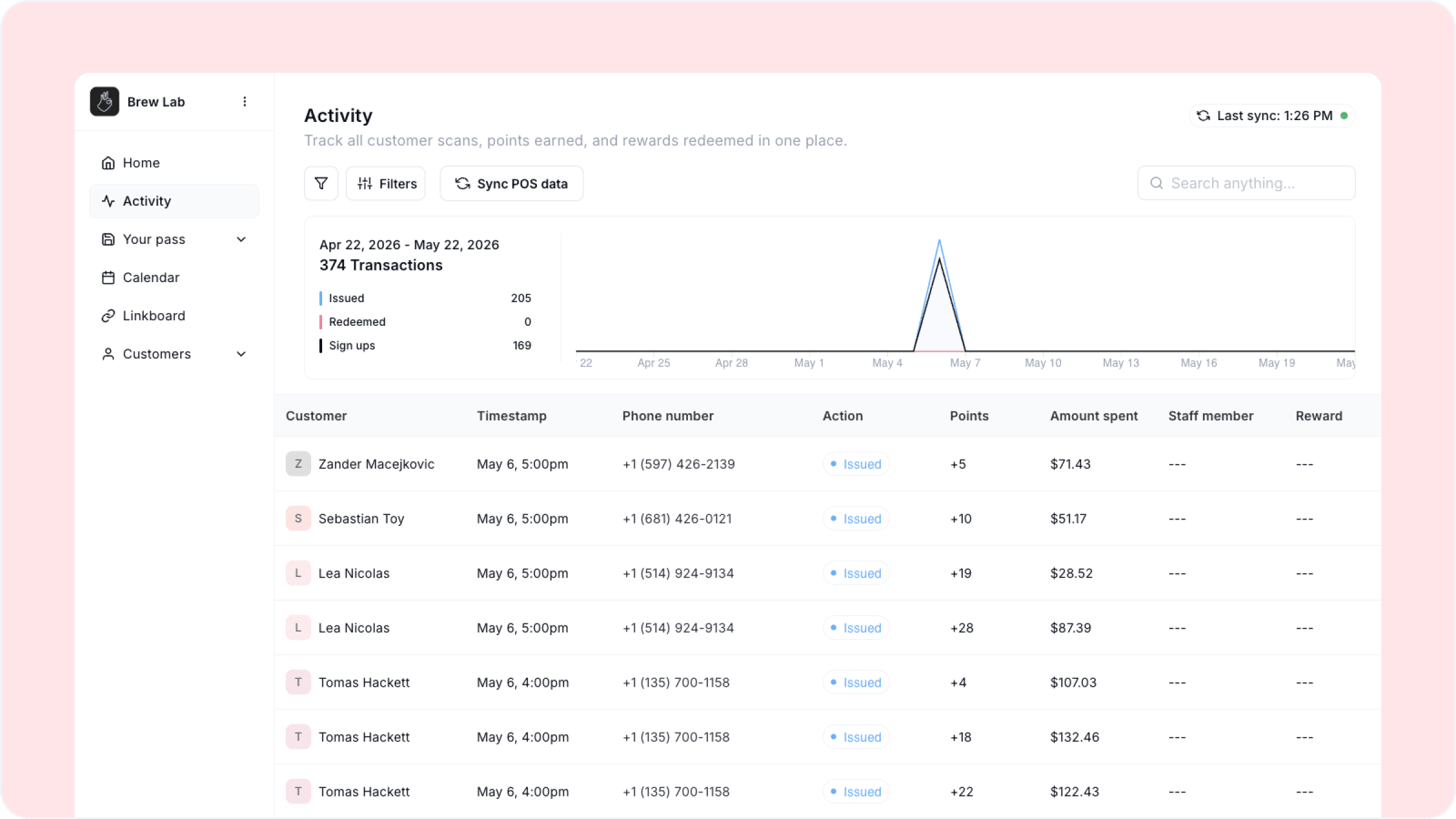
The activity log shows a chart at the top summarising your transactions over the selected period, broken down into three lines:
Issued — total point-issuing transactions
Redeemed — total reward redemptions
Sign ups — total new customer sign ups
Below the chart every individual transaction is listed in a table with the following columns:
Customer — the customer name associated with the transaction
Timestamp — the date and time the transaction occurred
Phone number — the customer's phone number on file
Action — whether the transaction was an issue or a redemption
Points — how many points were issued or redeemed
Amount spent — the purchase amount recorded at the time of the transaction
Staff member — which team member processed the transaction
Reward — which reward was redeemed if applicable
Filtering and searching
Use the Filters button to narrow the log by date range, action type, or staff member. Use the search bar to find a specific customer by name.
POS sync
If you have connected a POS system you will see a Sync POS data button at the top of the activity log. This pulls your latest POS transactions into Worthify so you can cross-reference them against your Worthify transactions. See the POS sync article for a full breakdown of how this works.
The staff member column is one of the most useful columns in the table. If you notice unusual activity — a spike in redemptions or transactions that do not match expected purchase amounts — you can filter by staff member to investigate quickly.
FAQs
How far back does the activity log go? The activity log shows your full transaction history from the day your program went live.
Can I export the activity log? Contact our support team if you need to export your transaction data.
What does it mean if the staff member column shows blank? This can happen if a transaction was processed without a staff member being logged in, or if the transaction came through a POS integration rather than the scanner app.
Can I delete or reverse a transaction? Contact our support team if you need to make adjustments to a transaction record.
Next steps
Customer insights
Transactions POS sync
Understanding your pass insights