Pass insights
A snapshot of how your rewards program is performing — updated in real time.
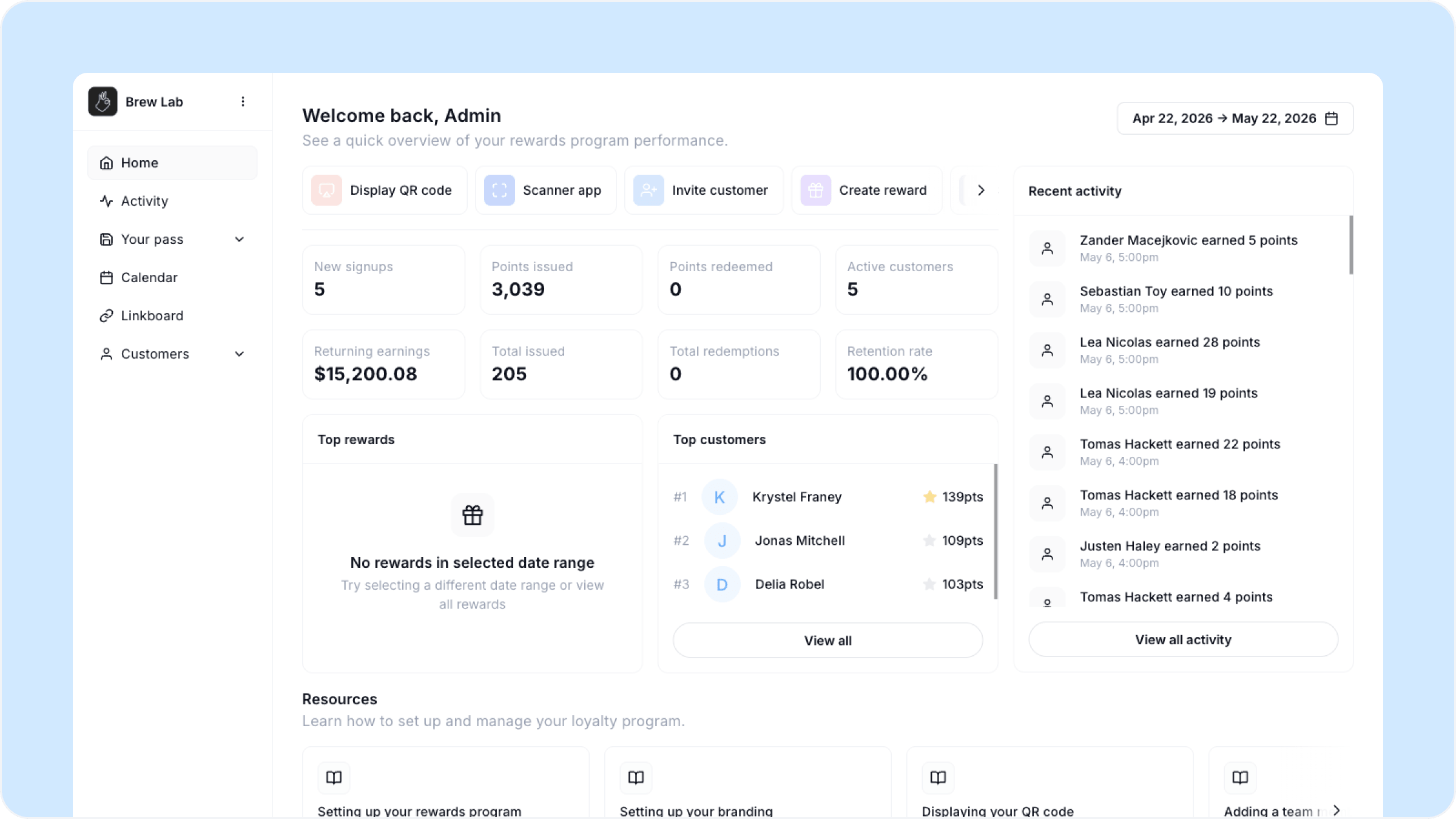
Overview
Pass insights gives you a high-level view of your program's performance across any date range. Use it to track growth, monitor engagement, and spot your top customers and most redeemed rewards at a glance.
To get here, go to Home in your dashboard. This will move to Your pass, then Insights in a future update.
Date range
All metrics on this page reflect the date range selected in the top right corner. You can adjust this to view performance over any period — the last 30 days, a custom range, or all time.
Key metrics
New signups The number of customers who saved your pass for the first time in the selected period.
Points issued The total points awarded to customers across all transactions in the selected period.
Points redeemed The total points customers have used to claim rewards in the selected period.
Active customers The number of customers who have made at least one transaction in the selected period.
Returning earnings The total revenue generated by returning customers — customers who have visited more than once — in the selected period.
Total issued The cumulative number of point-issuing transactions recorded in the selected period.
Total redemptions The total number of rewards redeemed by customers in the selected period.
Retention rate The percentage of customers who have returned for a second visit or more within the selected period.
Top rewards
Shows which of your redeemable rewards have been claimed most within the selected date range. If no rewards have been redeemed in the period you will see an empty state — try widening your date range.
Top customers
A ranked list of your most engaged customers by points balance in the selected period. Click View all to see your full customer list.
Recent activity
A live feed on the right side of the screen showing the most recent transactions across your program — points issued, rewards redeemed, and new signups as they happen.
Retention rate is the most important number on this page. A healthy retention rate means your program is working. If it starts dropping, check your Reward Moments are enabled and your rewards are compelling enough to bring people back.
FAQs
Why do some metrics show zero? This usually means no activity occurred in the selected date range. Try adjusting the date range to a wider period.
What counts as an active customer? Any customer who has had at least one transaction — points issued or reward redeemed — within the selected date range.
How is retention rate calculated? Retention rate reflects the percentage of customers who have returned for more than one visit within the selected date range.
How often does the data update? Pass insights updates in real time. The recent activity feed on the right reflects transactions as they happen.